How to create a GoCardless access token?

  1. Log in to your Sandbox / Live GoCardless Dashboard and go to the developer section
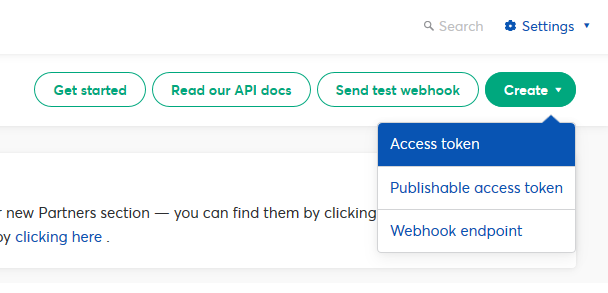
  2. Click the 'Create' button in the top-right and choose 'Access token'
  3. Name your access token, choose scope 'Read-write access' and click 'Create access token'
  4. Now the new access token will be shown to you. Please copy it now, as you will not be able to see this again. This new token is now active and ready to use
  • 0 Користувачі, які знайшли це корисним
Ця відповідь Вам допомогла?

Схожі статті

How to download this add-on?

Go to My Products > My Products & Services Click on Nifty Direct Debit (GoCardless) -...

How to configure?

Configuration Description Display Name Payment type name to show during checkout...

Installing / uninstalling

How to install? Using FTP copy both "includes" and "modules" folder to the root of your WHMCS...

Error codes and descriptions

Error CodeDescription NDD_1101 Invalid license for Direct Debit payment method....

How to import / map existing direct debit mandates from GoCardless?

Follow these steps only if you are already using some other GoCardless gateway module and moving...