How to see the total number of alerts pending?

1. Stats area

Just above the menu, where Pending Orders, Overdue Invoices, etc. It will show 'X Pending Alerts', where X is the total number of alerts.

Screenshot:

 

Move the mouse over 'X Pending Alerts' to see summary of the alerts.


2. Sidebar

On the left side menu, it will show a new section called Nifty Alerts. Under that you could see 'X Pending Alerts'.

Screenshot:
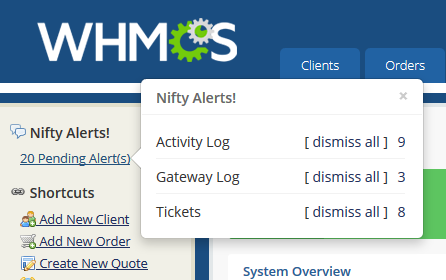
Move the mouse over 'X Pending Alerts' to see summary of the alerts.

  • 0 Utenti hanno trovato utile questa risposta
Hai trovato utile questa risposta?

Articoli Correlati

How to download this add-on?

Go to Services > My Products & Services Click on Nifty Alerts! - will show only if you...

Installing / uninstalling

How to install? Using FTP copy "modules" folder to the root of your WHMCS installation How to...

How to configure?

Configuration Description Logs / Actions to monitor The logs and actions you...

How to minimise / close / dissmiss all the alerts?

  Minimise alerts You can minimise the alerts to keep it active without closing and avoid...