
How to configure my website to disable the apps turned OFF by visitor on GDPR compliant cookie consent dialog?
The implementation depends on how apps (scripts) are implemented in your website
HTML Website - General / Inline implementation
This is the common implementation where scripts are included into the website directly.
All you need to do is just wrap each script with an if condition with the app name you defined in Nifty Cookie Consent configuratoin
- In your website source files, go to each script tags you have included in your website
- Wrap content of the script tag with the if condition,
if (NiftyCookieConsent.cookies()..enabled) { }Example for Google Analytics script,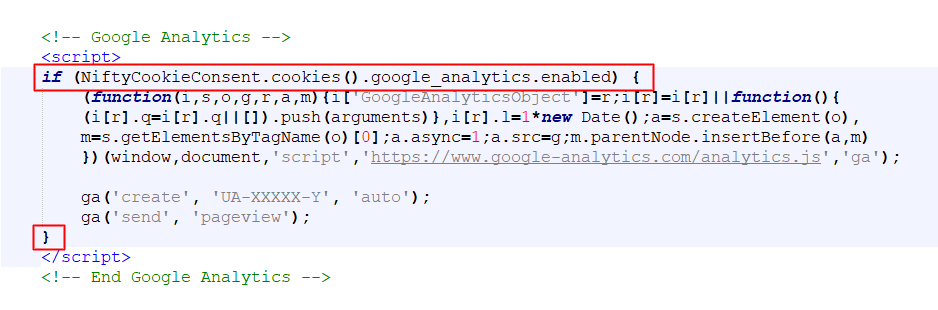
Google Tag Manager
Refer Step 3 fo How to integrate with Google Tag Manager (GTM)?
Joomla! / WordPress Website
The Joomla! and WordPress Cookie Consent plugin will inteligently disable the apps using the keywords and / or script URLs configured for the relevant apps
- Login into Your Account
- Go to My Products > Manage Nifty Cookie Consent
- Edit each app listed in Cookies used and update 'Keywords' with a uniquely identifiable word which is used within the particular app script
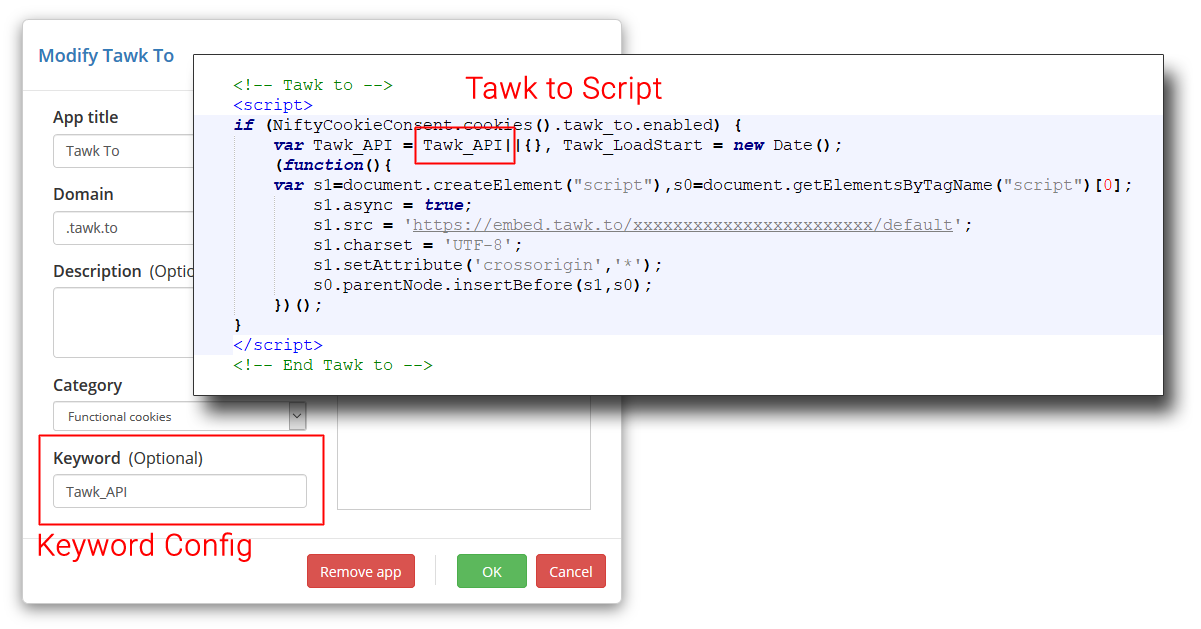
Note: For the apps you could not configure Keyword, the above General / Inline implementation steps needs to be followed
